


To pay for your NBI clearance at 7-Eleven, choose 7-Eleven as your payment option on clearance.nbi.gov.ph and save the reference number. At the store, tap Bills Payment → NBI on the CLiQQ kiosk, enter your details and print the payment slip, or generate a barcode in the CLiQQ app before you go. Give the slip or barcode to the cashier and pay the total in cash, usually ₱155–₱160.
Keep the receipt until you have your clearance. Cash payments can take longer to post than e-wallet payments, so pay at least a day before your appointment, then check that your application says Paid.
| Where | Any 7-Eleven store; most are open 24 hours |
| Kiosk route | CLiQQ kiosk → Bills Payment → NBI → print the slip → pay at the counter |
| App route | CLiQQ app → Pay Bills → NBI → show the barcode at the counter |
| How you pay | Cash. Bills payments have traditionally been cash only |
| Amount | The total the portal shows, usually ₱155–₱160. Check the slip for any store fee |
| Proof of payment | Your 7-Eleven receipt. Photograph it, because the paper fades |
| Wrong reference number? | It can’t be undone at the counter, so check before you pay |
We are not the NBI or 7-Eleven. This is an independent guide. Pay only at a 7-Eleven counter, using the reference number from clearance.nbi.gov.ph. Never give your money to someone who offers to pay it for you.
Jump to:
What you need before you go
Bring these with you:
- Your NBI reference number. The portal shows it after you book your slot and choose 7-Eleven as your payment option. Take a screenshot or write it down clearly. If you’ve lost it, here’s where to find your NBI reference number.
- Cash for the exact total the portal showed, plus a little extra in case the slip includes a store fee.
- Your mobile phone. The kiosk asks for your number, and on the app route you show the barcode on screen.
- The CLiQQ app, if you’d rather skip the kiosk. It’s free on Android and iPhone.
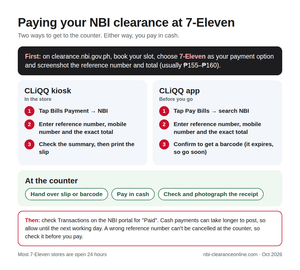
How to pay at the CLiQQ kiosk
The CLiQQ kiosk is the touch-screen machine inside the store, and 7-Eleven says almost all of its branches have one. Nothing is paid at the kiosk itself: it prints a slip, and you pay at the counter.
Step 1 — Tap Bills Payment
On the kiosk’s home screen, tap Bills Payment. If someone from the staff is nearby, ask whether the kiosk is working before you queue.
Step 2 — Find NBI in the list of billers
Look for NBI among the government billers, or search for it. Tap it to open the payment form.
Step 3 — Enter your payment details
Fill in each field carefully. One wrong character, and the payment won’t reach your application.
What to type in each field
| Field | What to enter |
|---|---|
| Reference number | The NBI reference number from the portal, every character |
| Mobile number | Your own number, so you can be reached about the payment |
| Amount | The exact total the portal showed you |
Don’t type the NBI ID number printed on an old clearance. It’s a different number, and the payment won’t reach your application; here’s how the NBI ID number and reference number differ.
Step 4 — Check the summary and print the slip
The kiosk shows a summary before it prints anything. Compare the reference number with your screenshot, digit by digit, and press Back if anything is wrong. When it’s right, confirm and take the printed slip.
Step 5 — Pay at the counter
Give the slip to the cashier and pay in cash. The cashier scans the slip and hands you a receipt.
Check your receipt before you leave
- The reference number on the receipt matches your NBI reference number.
- The amount is what you expected to pay.
- Photograph the receipt straight away. Thermal paper fades, sometimes within weeks.
How to pay with the CLiQQ app instead
The CLiQQ app is 7-Eleven’s own app. It lets you prepare the payment at home and skip the kiosk queue, which also helps when the kiosk is down. You still pay in cash at the counter.
In the app
- Open the CLiQQ app and tap Pay Bills.
- Search for NBI and select it.
- Enter your reference number, mobile number and the exact total.
- Check the details and confirm. The app generates a barcode.
At the store
Show the barcode on your phone to the cashier and pay in cash. Payment barcodes expire, so generate yours shortly before you go, and make a new one if the cashier says it has expired. Keep the receipt, just as you would with the kiosk.
How much you’ll pay at 7-Eleven
The NBI’s fee is ₱130, plus an e-payment charge of about ₱25–₱30, so the portal usually shows a total of ₱155–₱160. That’s the amount to enter on the kiosk or in the app.
If the slip or barcode screen shows a slightly higher amount, a store service fee has been added; ask the cashier before paying if you’re unsure. Online renewals with delivery cost more, as our NBI clearance fee breakdown shows.
Bring cash. Many 7-Eleven stores now take cards and QR payments for purchases, but bills payments have traditionally been cash only, so don’t rely on paying the NBI fee by card.
After you pay: check that it says Paid
Log in at clearance.nbi.gov.ph and open Transactions. Your application changes from Pending to Paid once the payment is posted. That’s often the same day, but cash payments can take longer than e-wallet payments, so give it until the next working day before you worry.
Once it shows as Paid, you have a 15-day grace period to visit the branch you chose. If your plans change, see what to do if you miss your NBI appointment.
At the branch, show your reference number and the 7-Eleven receipt or a photo of it, together with two valid IDs.
7-Eleven payment problems and how to fix them
The kiosk is offline, or the store doesn’t have one
Use the CLiQQ app instead, or try another branch. Kiosks are sometimes down for maintenance, and the app route doesn’t need one.
You can’t find NBI on the kiosk or in the app
Search for NBI rather than scrolling, and update the app if you’re using it. If NBI still doesn’t appear, ask the staff, or pay through another channel the portal offers.
The amount on the slip doesn’t match the portal
Don’t pay yet. Check whether the difference is a store service fee. If you typed the wrong amount, start again with the right one. Nothing is paid until the cashier takes your cash.
You paid with the wrong reference number
The payment won’t reach your application, and the cashier can’t cancel it afterwards. Report it straight away to 7-Eleven customer care at (02) 8711-0711 or 0919-0-711-711, with your receipt, and tell the NBI helpdesk at (02) 8524-1277 or 0939 150 2880. If your appointment is close, you may need to pay again with the correct number while they trace the first payment.
It still says Pending the next working day
Check your receipt
Make sure the reference number and amount on the receipt match your application. If they don’t, see the problem above.
Contact the NBI with proof
Call the NBI clearance helpdesk at (02) 8524-1277 or 0939 150 2880 and have a clear photo of your receipt and your reference number ready. Don’t pay again while the first payment is being checked.
Your receipt faded or got lost
A photo of it will do. If you have none, check that the portal shows Paid: the payment is then linked to your reference number, which is what the branch asks for. From now on, photograph every receipt as soon as you get it.
Paying for someone else at 7-Eleven
Anyone can pay your NBI fee at 7-Eleven for you, which helps if you don’t live near a store or you’re paying for a parent or child. Send them a screenshot of the reference number and the total, and ask for a photo of the receipt afterwards.
7-Eleven or another way to pay?
7-Eleven suits people who want to pay in cash at any hour. If you’d rather not queue, an e-wallet is quicker; here’s how to pay with GCash. For another cash option, you can pay at a Bayad Center, and our guide to all NBI clearance payment methods compares every channel.
FAQs: paying for your NBI clearance at 7-Eleven
Yes. Choose 7-Eleven as your payment option on the NBI portal, then pay in cash at any 7-Eleven using the CLiQQ kiosk or a barcode from the CLiQQ app.
The total the portal shows, usually ₱155–₱160. If the slip shows a slightly higher amount, a store service fee has been added.
Don’t count on it. Many stores accept cards and QR codes for purchases, but bills payments have traditionally been cash only. If you’d rather pay with an e-wallet, GCash and Maya let you pay the NBI fee in their own apps.
If you use the kiosk, yes: the cashier scans it. If you use the CLiQQ app, show the barcode on your phone instead.
Often the same day, but cash payments can take longer. If it’s still Pending the next working day, contact the NBI helpdesk with a photo of your receipt.
Yes. They only need your reference number and the exact total.

Add Comment